
How to manage remote employees
A remote employee can be fully logged in, fully caught up, and still invisible to the person managing them. That’s the whole problem in one sentence. Office management leans on things that don’t exist remotely: overheard conversations, a glance at someone’s screen, the simple fact of seeing a person at their desk. Take those away and most managers default to one of two bad habits, checking in constantly or not checking in enough.
This guide covers what actually works instead: setting expectations people can meet, building a system where status is structural rather than something you chase, and keeping a distributed team from drifting into chaos as it grows.
Why managing remote employees is a different skill
In an office, management happens partly by accident. You overhear a blocker before it becomes a missed deadline. You notice someone’s gone quiet and ask if they’re okay. None of that happens automatically when a team is remote, so everything that used to be informal has to become a deliberate system: how status gets shared, how questions get answered, how someone new learns what “good” looks like.
Gallup’s research on engagement found that managers account for at least 70% of the variance in engagement scores across business units. That effect doesn’t shrink for remote teams, if anything it grows, because a remote employee has fewer other signals (a supportive office culture, a friendly desk neighbor) to fall back on when their direct manager isn’t giving them clarity.
Build the foundation before anyone logs on
The teams that manage remote employees well tend to do one unglamorous thing early: they write things down. Not everything, just the handful of processes that get asked about repeatedly, documented once instead of explained over Slack for the tenth time. If that documentation doesn’t exist yet, SOP management software is usually the fastest way to get it out of people’s heads and into something the whole team can reference.
The same logic applies to recurring work. If three different people are writing similar briefs or onboarding documents from scratch each time, that’s wasted effort a task template would eliminate, and it matters more for remote teams because there’s no one nearby to informally pass along the shortcut.
Set expectations people can actually meet
Vague expectations are survivable in an office because they get corrected in passing. Remotely, a vague expectation just sits there until it becomes a missed deadline or a frustrated message. Three things need to be explicit from day one:
- Core overlap hours. Not a rigid 9-to-5, but a window where the team is reliably reachable, especially across time zones.
- Response time by channel. Same-day for chat, 24 hours for email, immediate only for genuinely urgent flags. Without this, everything feels urgent.
- What “done” means. A deliverable with accepted criteria, not just an assigned task with a due date.
Harvard Business School Online’s guidance on remote and hybrid teams lands on a similar point: written norms, regular one-on-ones, and consistent communication through shared tools matter more once people stop sharing a physical space. Atlassian’s advice pushes in the same direction, with written goals and time-zone fairness as the baseline rather than a nice-to-have.
Communicate without burying people in noise
Remote teams tend to overcorrect on communication. Every update becomes a message, every message becomes a notification, and focus time disappears. The fix isn’t fewer updates, it’s fewer channels fighting for the same attention. If your team already feels like it’s drowning in pings, it’s worth reading how excessive email notifications hurt productivity, because the same pattern shows up in Slack and task tools too: volume doesn’t equal clarity.
A reasonable default is async-first for anything that doesn’t need a live discussion, with meetings reserved for decisions that genuinely benefit from real-time back-and-forth. That alone removes a large share of the “just following up” messages that make remote work feel noisier than office work ever was.
Track outcomes, not activity
This is where most remote management advice gets vague. “Focus on results, not hours” is true but not actionable on its own. In practice it means managers need real visibility into team activity that doesn’t depend on someone being online at a specific moment, a task board that shows what’s actually in progress, what’s stuck, and who owns each piece, updated because the system requires it rather than because someone remembered to post a status update.
The alternative, watching for green dots and quick replies, measures presence, not progress. It also tends to erode exactly the trust that makes remote work function in the first place.
Structure the team so growth doesn’t create chaos
A remote team of five can run on goodwill and a shared chat channel. A remote team of twenty-five cannot, roles blur, reporting lines get murky, and the same question gets asked in three different channels because nobody’s sure who owns the answer. This is exactly how project management becomes chaotic as teams grow, and remote teams hit the problem earlier than co-located ones because there’s no office layout quietly reinforcing who sits near whom.
The fix is deciding deliberately how teams and sub-teams should be structured well before the headcount forces the issue. Every project needs one person who owns the outcome, not every task, but the outcome, and who the team calls on when something stalls.
Remote team management software: what to look for
The right tool doesn’t fix bad management habits, but the wrong one makes good habits harder to sustain. For a remote team specifically, look for a system that keeps projects, tasks, events, and knowledge connected in one place rather than scattered across a chat app, a separate calendar, and a wiki nobody updates. If you’re still comparing options, our breakdown of how to choose the right project management software walks through the criteria in more depth, and smaller teams on a budget may prefer the lighter picks in our roundup of project management tools for startups.
Here’s how a few well-known tools stack up on pricing for a remote-first stack.
| Tool | Best for | Starting price |
|---|---|---|
| Techxaro One | Remote agencies and growing teams | Free trial + $5/user/month |
| Slack | Async and real-time chat | From $8.75/user/month |
| Notion | Shared docs and lightweight wikis | From $10/user/month |
| Asana | Cross-functional task planning | From $10.99/user/month |
| Zoom Workplace | Video-first meetings | From $13.33/user/month |
Close the trust gap, not the distance
A lot of return-to-office pressure comes down to one thing: managers who can’t see the work default to assuming it isn’t happening. Owl Labs’ 2026 State of Hybrid Work report found that when leaders explain why they want people back in the building, oversight is the most common reason by a wide margin.
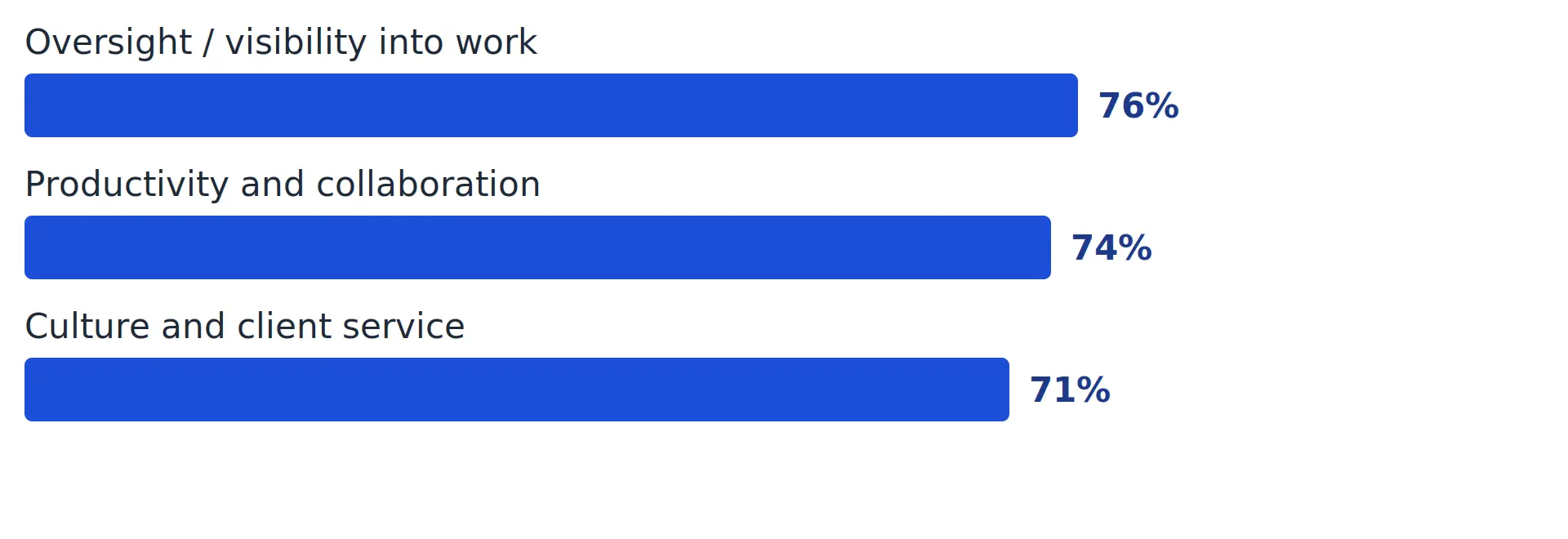
That’s a visibility problem, not an evidence problem. The same report found 82% of employees are now using AI at work, yet 46% said it has hindered their productivity at times and the same share worry it could make their role obsolete, which is its own kind of noise for a remote manager to filter out. (Our news desk covered the related finding that AI is adding to workloads for over half of employees rather than reducing them.) A manager with a clear, structural view of what’s actually moving doesn’t need to guess, and doesn’t need everyone back in a building to feel confident the work is getting done.
Keep remote employees engaged, not isolated
Isolation is a real and recurring concern in remote work research. Managers in Owl Labs’ 2024 survey reported noticeably more concern about loneliness on remote teams (19%) than on-site ones (14%), and it’s one of the few downsides of remote work that doesn’t fix itself with better project management software alone.
What helps: regular one-on-ones that aren’t just status meetings, informal time built into the week rather than squeezed out by back-to-back calls, and making sure new hires get folded into the team’s rhythm quickly instead of being left to figure it out. None of this needs to be elaborate, it needs to be consistent.
A weekly rhythm for managing remote employees
The specifics vary by team, but the shape tends to repeat. This is roughly the same cadence that works for managing a 20-person team effectively, remote or not, just with more of it happening async:
- Monday: confirm priorities in writing so nobody starts the week guessing what matters most.
- Daily: a short async update per person, what moved, what’s stuck, what’s next.
- Midweek: a workload check so nobody’s overloaded two days before a deadline hits.
- Friday: review what shipped, note anything that needed rework, and carry real blockers into next week instead of letting them quietly slip.
Agencies juggling several remote clients at once face a sharper version of this problem, since a missed internal update can turn into a missed client deadline fast. If that sounds familiar, it’s worth reading how agencies manage multiple clients without losing track of deadlines, and it’s worth checking your own setup against the most common project management mistakes in digital agencies before they cost you a client relationship.
Frequently asked questions
Q. How do you manage remote employees without micromanaging?
Ans: Track outcomes and ownership rather than activity. Set clear deliverables, give people a system where status is visible without constant check-ins, and save direct oversight for when a deadline or deliverable is actually at risk.
Q. How do I manage remote employees across different time zones?
Ans: Default to async communication for anything that doesn’t need a live discussion, define a core overlap window for the meetings that do, and rotate inconvenient meeting times fairly instead of always asking the same time zone to accommodate everyone else.
Q. How often should I check in with remote employees?
Ans: Most teams do well with one structured one-on-one per week or every two weeks per direct report, combined with a short daily async update so small blockers surface before they become missed deadlines.
Q. How do you measure productivity for remote employees?
Ans: Define clear deliverables and deadlines up front, then evaluate against those outcomes rather than hours online or response speed. Activity monitoring measures presence, not whether the work actually got done.
Q. What’s the biggest mistake managers make with remote teams?
Ans: Assuming silence means everything is fine. Remote employees often hesitate to raise concerns on their own, so managers need to ask directly and regularly rather than waiting for a problem to surface itself.
