
Best task management system for small businesses
The owner of a 12 person design studio keeps tasks in four places: a WhatsApp group, flagged emails, a paper notebook and her own head. On Tuesday a client asks about a revision that was agreed on Friday. Nobody can say who has it. The team does not lack effort. It lacks a system.
This guide shows you how to choose the best task management system for your small business. You get the three parts every working system has, a list of what to test in a trial, a weighted scorecard with a worked example, real cost math and a 2 week rollout plan. We make TechXaro One, so we say that up front. The method works with any tool, ours included.
What is the best task management system for a small business?
The best task management system for a small business is the simplest one that gives every task an owner, a due date and a status, and that your whole team opens every day. For most teams of 3 to 30 people, that means a list or board tool with comments, files and notifications.
Notice the word system. A system has three parts: a rule for how work gets in, a tool that holds it, and a rhythm for reviewing it. Most small businesses buy the tool and skip the other two, which is why the tool is abandoned within a month.
The three parts of a task management system
| Part | What it is | Example |
|---|---|---|
| Intake rule | Where every request must be recorded to count | “If it has an owner and a date, it goes in the tool.” |
| Tool | Where tasks live with an owner, date, status, files and comments | A list or board app your team opens daily |
| Review rhythm | A fixed moment when the team looks at the work together | A 15 minute weekly review and a daily glance at “my tasks” |
If your team currently runs work through chat, start with the intake rule. Our guide on how to stop using WhatsApp for task management gives a 30 day plan for exactly that.
What a small business needs from a task management tool
Quixy describes the small business need as a short learning curve, a usable free or low cost plan, and enough collaboration for the owner to see who is doing what (Quixy). Here is a fuller checklist, with a way to test each point during a trial.
| What to look for | Why it matters | How to test it in a trial |
|---|---|---|
| Owner, due date and status on every task | These three fields stop tasks from falling through | Create 10 real tasks. Can you leave any without an owner or date? |
| Fast capture on a phone | Tasks are born in meetings and on site, not at a desk | Time how long it takes to add a task. As a rule of thumb, if it takes over 20 seconds, people skip it. |
| Comments and files on the task | Keeps context out of chat threads | Attach a file and discuss it on the task itself |
| List, board and calendar views | People plan differently | Ask two teammates to work in different views for a day |
| Access for clients and contractors | Service firms need to share status without sharing everything | Invite a test guest and check what they can see |
| Control over notifications | Too many alerts get muted and then ignored | Turn everything off except assigned and due soon |
| An overdue and workload view | The owner sees who is stuck without asking | Filter overdue tasks by person |
| A price that scales per user | Costs grow with headcount | Calculate the price at your team size plus 10 people |
| Data export | Lets you leave without losing your history | Export a project and open the file |
Types of task management tools, and who they fit
Every roundup ranks its own favorite first, so this table groups tools by type instead of ranking them. Examples come from the roundups we reviewed, including The Digital Project Manager and Zapier. Features and prices change, so confirm on each vendor’s site.
| Type | Examples | Fits best | Watch out for |
|---|---|---|---|
| Simple task lists | Todoist, Microsoft To Do | Owners and very small teams | Limited team visibility and client access |
| Board based tools | Trello | Visual workflows such as content or sales pipelines | Boards can sprawl as work grows |
| All in one workspaces | ClickUp, Notion | Teams that want docs and tasks together | Setup time and a learning curve |
| Team task and project tools | Asana, Zoho Projects, Wrike | Several projects with handoffs between people | Features can depend on the pricing tier |
| Client work tools | Teamwork, Paymo, TechXaro One | Agencies and service firms managing clients | Overkill for a one person business |
| Spreadsheets | Google Sheets, Excel | One to three people, just starting | No reminders, and ownership depends on habit |
Pick by team size
What you need changes as the team grows. A three person studio needs speed. A thirty person firm needs visibility. Use this as a starting point, then run the scorecard below.
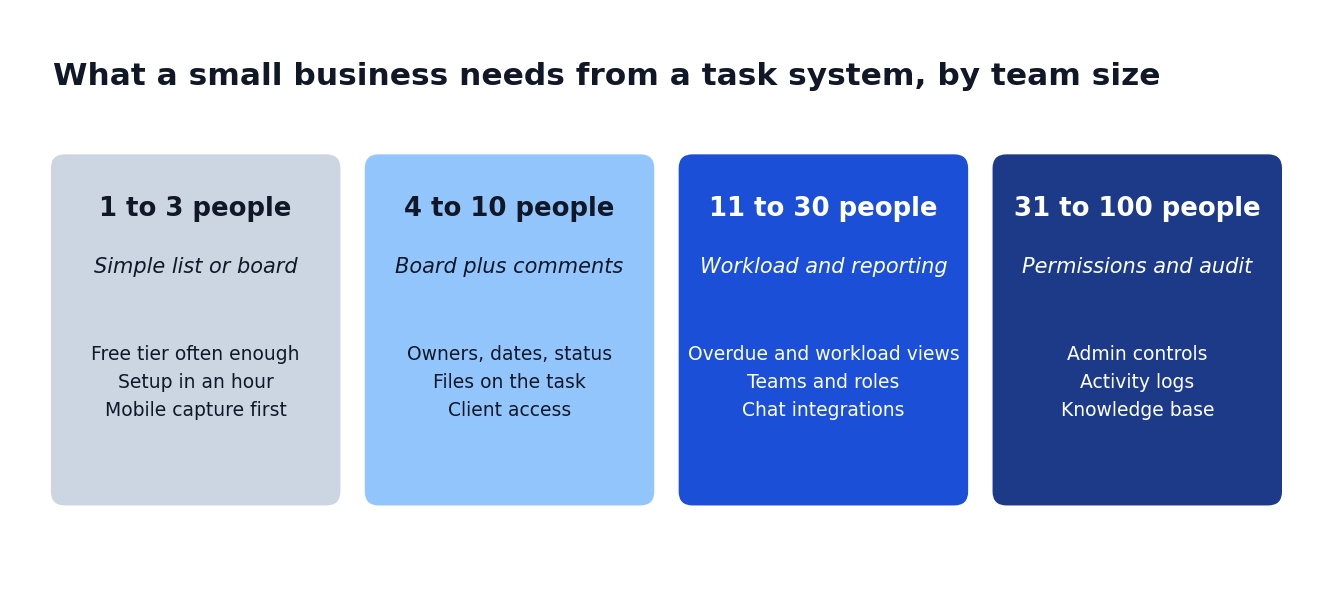
At 11 to 30 people, the owner can no longer hold the whole picture in their head. That is when overdue and workload views pay for themselves. Our posts on managing a 20 person team and why managers need visibility into team activity go deeper on that stage.
Score your shortlist with a weighted scorecard
Feature lists make every tool look good. A scorecard forces you to say what matters to you. Here is the method:
- List the 5 or 6 criteria that matter most from the checklist above.
- Give each a weight from 1 to 5 for how much it matters to your business.
- Run a trial of each tool using 10 real tasks, and score each criterion from 0 to 5.
- Multiply score by weight, then add up the results. With weights that add to 24, the maximum is 120.
This worked example is illustrative. The tools and scores are invented to show the method, not to review real products.
| Criterion | Weight | Tool A (simple list) | Tool B (board) | Tool C (all in one) |
|---|---|---|---|---|
| Ease of setup | 5 | 5 | 4 | 2 |
| Mobile task capture | 4 | 4 | 4 | 3 |
| Owner, due date, status | 5 | 4 | 4 | 5 |
| Client access | 3 | 1 | 2 | 4 |
| Reporting | 3 | 2 | 3 | 5 |
| Price at 15 users | 4 | 5 | 4 | 3 |
| Weighted total (max 120) | 90 | 87 | 86 |
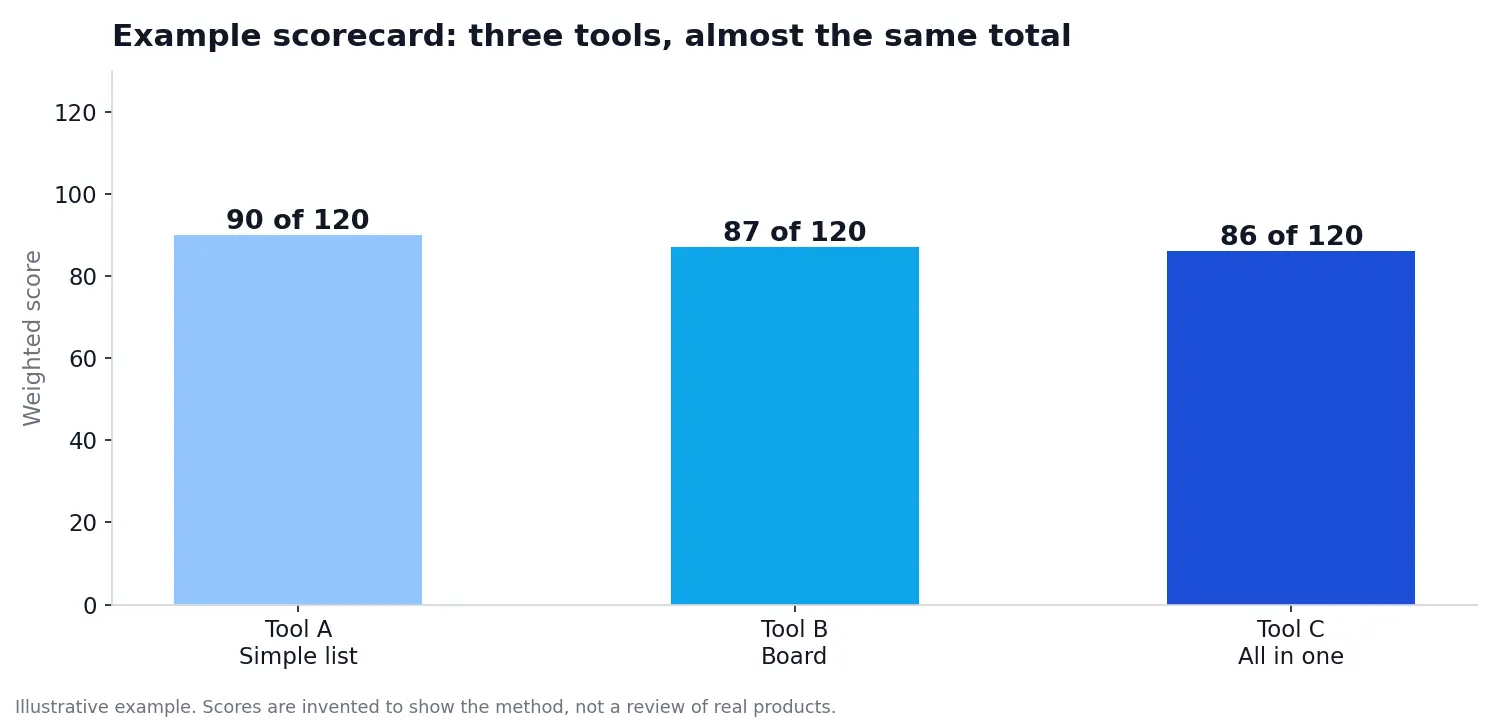
The totals sit within four points of each other, which is the useful lesson. When totals are this close, the tools are equal on average, so decide with your heaviest criterion. If client access is a weight 5 for you, Tool C wins despite finishing last. If setup speed is your weight 5, Tool A wins. The total only narrows the list. Your top priority makes the call.
What a task management system really costs
Most tools charge per user per month, so cost grows as you add people. Multiply users by the monthly price by 12. This table uses an illustrative price of $8 per user per month. Swap in the real price of each tool you shortlist.
| Team size | Monthly at $8 per user | Yearly |
|---|---|---|
| 5 users | $40 | $480 |
| 15 users | $120 | $1,440 |
| 30 users | $240 | $2,880 |
The sticker price is only part of it. Ask four questions before you commit:
- Do clients and guests count as paid seats?
- Which features sit behind a higher tier, such as reporting, templates or integrations?
- Is there a charge for extra storage or automations?
- How many hours will setup and training take, and who will do it?
For price comparisons across popular tools, see our post on 9 project management tools for startups and what they really cost. Prices change often, so check each vendor’s own page.
Where TechXaro One fits
Here is the disclosure again: we build TechXaro One, so weigh this section accordingly. It is a project and task management platform for agencies and growing teams. Based on our pricing page, it includes tasks and subtasks, teams, user profiles, reports, a calendar, comments, followers, events, a knowledge base, task and project templates, activity logs, email and desktop notifications, and connections to Slack, Microsoft Teams and Google Chat.
It fits best for service businesses and agencies from a handful of people to a few dozen, especially when you need to see work by client. If you only need a personal to do list, a simple list app will be faster and cheaper. You can explore the features, take the product tour, read the case studies or book a demo. If you run an agency, start with how agencies can manage multiple clients without losing track of deadlines.
A 2 week rollout plan
| Days | Action |
|---|---|
| 1 | Write the intake rule. Pick 5 or 6 criteria and set their weights. |
| 2 to 4 | Trial two or three tools with 10 real tasks each. |
| 5 | Score the tools and pick one. |
| 6 to 8 | Set up projects and templates and import open tasks. Our guide to employee task tracking methods helps here. |
| 9 to 10 | Pilot with one team. Managers use the tool first. |
| 11 to 14 | Move everyone over and hold the first 15 minute weekly review. See how to make employees accountable for deadlines. |
Keep notifications on a short leash while you roll out. Too many alerts teach people to ignore the tool, and we cover the reasons in how excessive email notifications hurt productivity.
Mistakes that kill a task management system
- Buying for features you will not use. A tool with 200 features and a week of setup loses to a simple one your team opens daily.
- Skipping the intake rule. Without it, tasks keep arriving by chat and email, and the tool holds only half the work.
- Having no owner for the system. Someone must keep templates, clean up old tasks and answer questions.
- Running two sources of truth. If status lives in the tool and in a spreadsheet, the spreadsheet wins.
- Ignoring mobile. If adding a task on a phone is slow, tasks will not get added.
Frequently asked questions
Q. What is the best task management system for a small business?
Ans: The best one is the simplest system that gives every task an owner, a due date and a status, and that your whole team uses daily. Choose by testing candidates with real tasks and a weighted scorecard, not by feature lists.
Q. What is the difference between task management and project management?
Ans: Task management tracks individual actions, each with an owner, a due date and a status. Project management groups tasks toward an outcome, adding timelines, dependencies and reporting. Many tools do both, and small businesses often need task management first.
Q. Is there a free task management system for small businesses?
Ans: Many tools offer free plans, usually with limits on users, storage or features. A free plan can work for a very small team. Check the limits against your needs, and compare the paid price at your team size before you commit.
Q. When does a small business need task management software?
Ans: As soon as one person assigns work to another and you cannot easily say who owns what. For many teams that happens at three to five people. If tasks are already getting lost in chat, you are past that point.
Q. Can I use a spreadsheet instead of a task management tool?
Ans: For one to three people, yes. A spreadsheet has no reminders, no comments on rows and no clear ownership beyond habit. It tends to break as more people edit it, so plan to move when the team grows.
Q. How do I get my team to use a new task management system?
Ans: Make the tool the only place a task counts. Managers use it first, chat stays for quick questions, and you hold a short weekly review inside the tool. Start with one pilot team before moving everyone.
Q. How much should a small business spend on task management?
Ans: Multiply the per user price by your team size and 12, then add any add ons and the time for setup. Compare that yearly figure across tools. Spend what you would lose to missed deadlines and time spent asking for updates.
Q. Which task management system is best for agencies?
Ans: Look for client access with limited permissions, deadlines grouped by client, and reporting on overdue work. Agencies also need reliable notifications, since several clients compete for attention at once.
