
How to stop using WhatsApp for task management
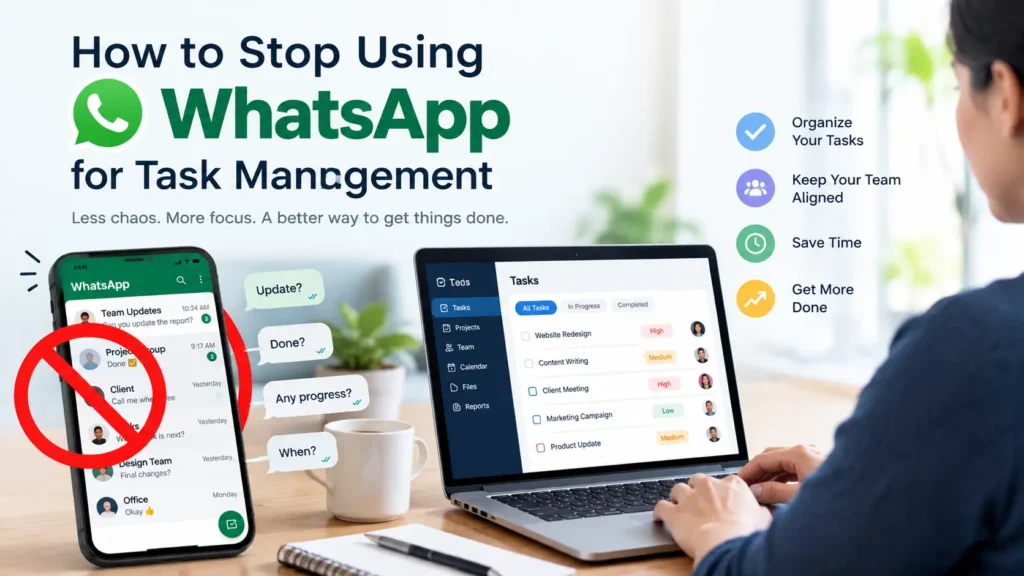
Someone posts “Can anyone send the invoice to the client?” in the team group at 4:12 pm. Three people react with a thumbs up. Nobody sends it. By morning the message is forty messages up, and the client is asking where the invoice is. If you want to stop using WhatsApp for task management, that is the moment to start, because the problem is not your team. A chat has no place to put an owner, a due date or a status.
This guide gives you a 30 day plan to move tasks out of WhatsApp without losing the speed your team likes about it. You will get a chat audit method, a rule you can announce in one sentence, a table that turns real messages into proper tasks, a list of what should stay in WhatsApp, and a cutover message you can copy.
Why WhatsApp feels like task management, and where it stops
WhatsApp works for task management until work needs an owner, a due date and a status. A group chat can carry the request, but it cannot record who accepted it, when it is due or whether it is done. Those three gaps are why requests get lost and managers end up asking for updates.
WhatsApp has not stood still. In 2026 it added group message history for new members, member tags, event reminders, polls with an end time and anonymous voting, and an @all mention (WABetaInfo, Business Today). Those features help a group decide and show up. They still do not let you assign a task to a person, set a status or see what is overdue.
Based on WhatsApp’s published group features in October 2026, here is how a group chat compares with what a task needs. Check the current release notes before you rely on it, since WhatsApp ships changes often.
| What a task needs | WhatsApp group chat | Task tool |
|---|---|---|
| One named owner | Mentions at best, ownership is implied | Assignee field |
| Due date and time | Event reminders for events, not for tasks | Due date with alerts |
| Status: to do, in progress, done | None | Status field and board view |
| Priority | None | Priority field |
| Files and comments kept with the request | Scroll away with the chat | Attached to the task |
| A view of what is overdue | None | Filters and dashboards |
| Controlled access for clients | Group membership only | Role based permissions |
| History after someone leaves | Lives on individual phones | Stays in the workspace |
What the research says about chat interruptions
Gloria Mark, a professor at the University of California, Irvine, has studied workplace interruptions for years. In an interview published by Gallup, she reported that people switched activities every 3 minutes and 5 seconds on average, and switched working spheres every 10 minutes and 29 seconds. After an interruption, it took 23 minutes and 15 seconds on average to return to the interrupted work, usually after about two other tasks (Gallup). A 2005 paper she wrote with Victor Gonzalez and Justin Harris reports 25 minutes and 26 seconds (summary of both figures).
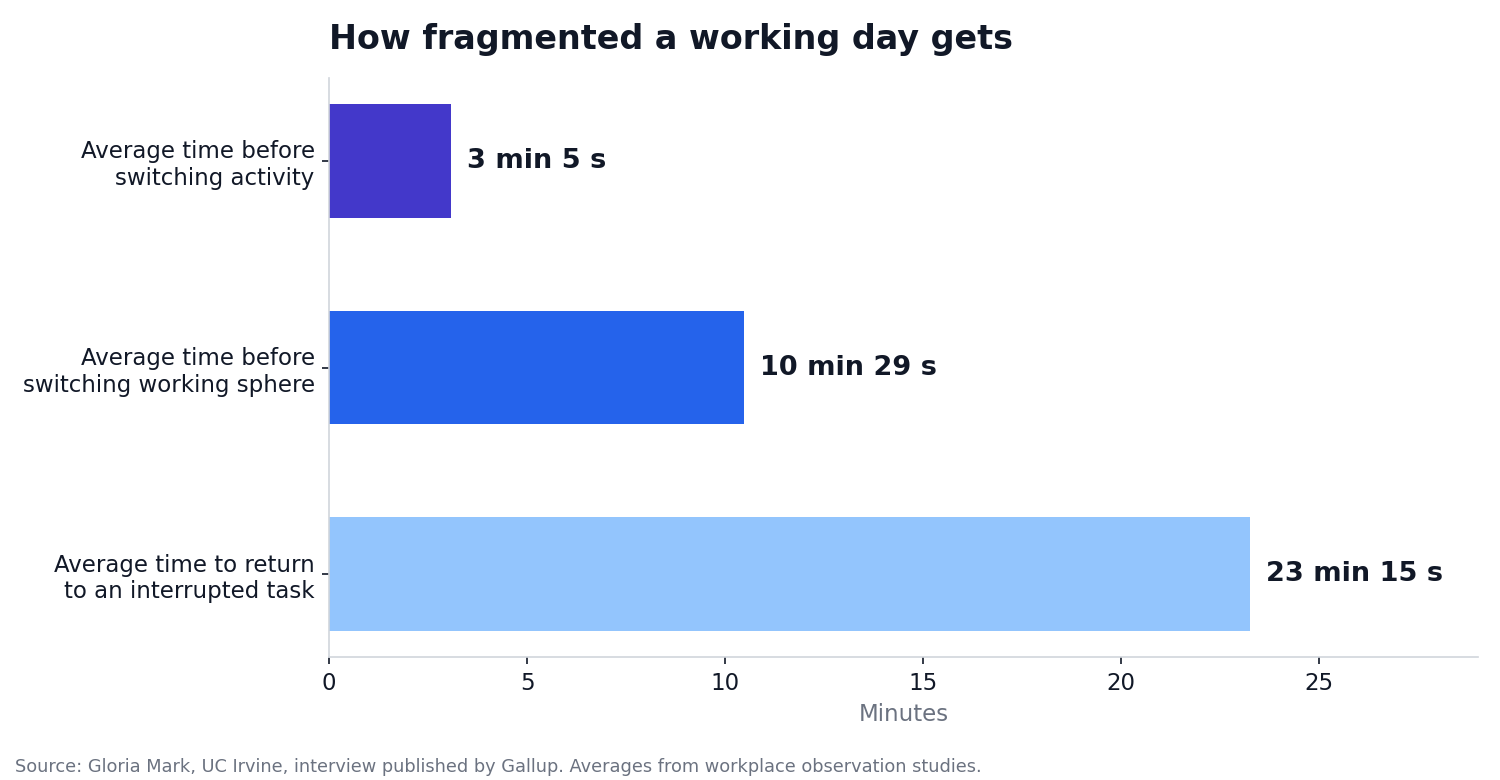
Two caveats keep this honest. The 23 minutes includes time spent on other work, not time staring at a screen. And Mark found that an interruption about the task you are already doing can help, while an unrelated one hurts. That is the useful lens for WhatsApp. A message about your own task is fine. Fifty messages about everyone else’s tasks are the cost.
How to stop using WhatsApp for task management: a 30 day plan
The goal is not to delete WhatsApp. The goal is to separate conversation from commitments, so a request with an owner and a date stops depending on someone’s memory. Here is the plan at a glance.
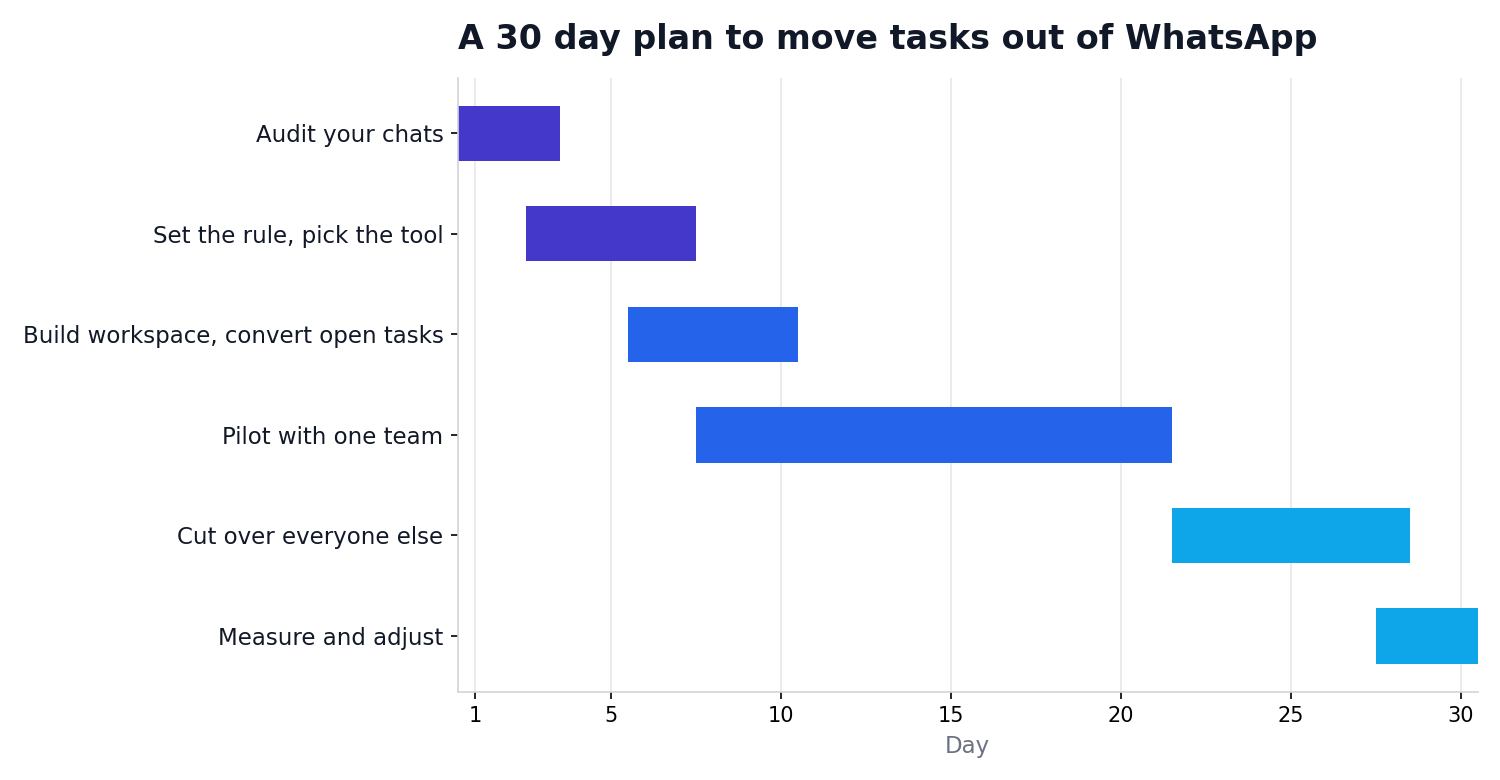
Step 1: Audit your last 7 days of chats (days 1 to 3)
Open your main work groups and scroll back seven days. Copy every message that asks for something to be done into a sheet with four columns: the request, who it was for, the due date mentioned, and whether it got done. Then count.
Your task leak rate is the number of requests with no named owner or no due date, divided by all requests you found. For example, if you found 40 requests and 22 had no owner or no date, your leak rate is 55 percent. Write your number down. You will measure it again on day 30.
Also count the messages that only ask for status, such as “any update?” Each one is the price of having no status field.
Step 2: Set one rule you can say out loud (day 3)
Pick a rule short enough to repeat in a meeting. A good one: “If it has an owner and a date, it lives in our task tool. Everything else can stay in chat.” A rule with exceptions and sub rules will not survive the first busy week.
Step 3: Pick a task tool your team will open (days 3 to 7)
Your team stays on WhatsApp because it is fast. Whatever replaces task tracking has to pass the same test. During a trial, check five things:
- A mobile app that is nearly as quick as sending a message
- Comments and files attached to the task, not floating in a separate place
- Client access with limited permissions
- Control over which notifications you get
- A way to export your data when you want to leave
TechXaro One is one option that covers these. It lets you create projects, assign tasks with deadlines, keep comments and files on the task, and invite clients with set permissions. You can look at the features or take the product tour before you commit. Run the same five checks on any tool you shortlist, including ours.
Step 4: Convert messages into tasks (days 6 to 10)
Take the open requests from your audit and rewrite each as a task. The pattern is the same every time: a specific title, one owner, a due date and a definition of done. These examples are illustrative.
| WhatsApp message | What is missing | As a task |
|---|---|---|
| “Can someone send the invoice to Acme?” | Owner, date | Send invoice 1042 to Acme. Owner: Sara. Due: Thursday 5 pm. Done when the PDF is sent and the client confirms. |
| “Homepage banner needs changes” | Scope, reviewer | Update homepage banner copy. Owner: Ali. Due: Friday noon. Reviewer: Hina. Attach the current banner and new copy. |
| “Remember the client call tomorrow” | Prep steps, owner | Prepare the agenda for the Acme call. Owner: Dan. Due: today 3 pm. Subtasks: share the deck, confirm attendees. |
| “Server is slow again” | Owner, priority | Investigate the slow server. Owner: the on call developer. Priority: high. Due: today. Log findings in the comments. |
Step 5: Decide what stays in WhatsApp (day 7)
You are not banning chat. You are giving each tool a job.
| Stays in WhatsApp | Moves to the task tool |
|---|---|
| Quick questions that need a yes or no | Any request with an owner and a date |
| Urgent heads ups, such as “the site is down” | The fix for it, as a task with an owner |
| Team banter and morale | Approvals and sign offs |
| Scheduling a call | Files that belong to a deliverable |
| Client chat, if the client prefers it | Status updates |
One habit makes this stick. When a WhatsApp conversation produces work, create the task, then paste the task link back into the chat. The chat points to the task, and nobody has to scroll to find what was agreed.
Step 6: Pilot with one team, then cut over (days 8 to 28)
Pick one team and run the rule for two weeks. During the pilot, managers go first: stop asking “any update?” and open the board instead. If the pilot team keeps sending requests in the group, answer with “Can you put that in a task?” until it becomes automatic.
After two weeks, announce the cutover to everyone. You can use this message as is:
From Monday, any request with an owner and a due date goes into our task tool. WhatsApp is for quick questions and urgent heads ups. If you send a request in the group, I will ask you to turn it into a task. The goal is simple: nobody should have to remember what was agreed.
Step 7: Measure on day 30
Go back to your audit and compare:
- Recalculate the task leak rate for tasks created after the cutover
- Count “any update?” messages in the last seven days against your baseline
- Count overdue tasks and who owns them
- Ask each person one question: where do you look first to see what you need to do today?
You are not aiming for zero WhatsApp. You are aiming for a leak rate close to zero on anything created after the cutover, and a team that knows where to look.
If clients insist on WhatsApp
Agencies hit this wall first, because clients rarely change their habits. Keep the client’s WhatsApp thread as the conversation channel, and make one person responsible for it. That person turns each client request into a task with a due date within minutes, then replies with the date. The client sees a commitment, and your team sees work. If your tool supports client access with limited permissions, let the client see status themselves. Once they can, status messages can drop.
Mistakes that send teams back to WhatsApp
- Moving everything at once. A pilot with one team finds the friction before it costs everyone.
- Running two sources of truth. If tasks live in the tool but “just checking” happens in chat, the tool loses to the chat within a month.
- Choosing a tool heavier than the work. If creating a task takes longer than sending a message, people will send the message.
- Leaders breaking their own rule. If the manager sends requests in the group, the team will too.
Where TechXaro One fits
We built TechXaro One as a project management platform for agencies and growing teams: projects with phases, tasks with deadlines, comments and files on each task, a dashboard for progress, and client invites with permissions. If you want to test the plan above on a real team, you can start a free trial (30 days, no credit card) from the pricing page or book a demo. Questions about setup are covered in the FAQs and the help center, and more guides are on the TechXaro One blog.
Frequently asked questions
Why is WhatsApp bad for task management?
WhatsApp is built for conversation, so it has no fields for an owner, a due date or a status. Requests scroll out of view, people assume someone else picked them up, and managers end up asking for updates. It works for a few people and a few tasks. It breaks as volume grows.
Can I use WhatsApp Business for task management?
WhatsApp Business is designed for customer conversations. It adds business features on top of chat, but it still does not track an owner, a due date and a status for internal work. For team tasks, use a task tool and keep WhatsApp Business for customers.
How do I stop my team using WhatsApp for work tasks?
Set one rule, such as: if a request has an owner and a due date, it goes in the task tool. Audit your chats, convert open requests into tasks, pilot with one team for two weeks, then cut over. Leaders must follow the rule first, or the team will drift back.
Should I delete our WhatsApp groups?
No. Keep the groups for quick questions and urgent heads ups. Remove the expectation that work is tracked there. Renaming a group, for example by adding “chat only” to the name, helps nobody mistake it for the record of work.
What can WhatsApp still be used for?
Quick yes or no questions, urgent alerts, social conversation, and client chats where the client prefers WhatsApp. When a chat produces work, create a task and paste its link back into the chat.
How long does it take to move tasks out of WhatsApp?
Plan for 30 days: about 3 days to audit, a week to choose and set up a tool, two weeks to pilot, and a few days to cut over and measure. Small teams can go faster. Larger teams should keep the pilot.
How do I handle clients who only use WhatsApp?
Keep the client’s WhatsApp thread, but make one person responsible for it. They turn each request into a task with a due date within minutes and reply with that date. If your tool supports client access with limited permissions, let clients see status themselves.
What should I look for in a WhatsApp alternative for tasks?
Check that it has a mobile app that is quick to use, tasks with owners, due dates and status, comments and files attached to each task, client access with permissions, notification controls and a way to export your data. Test these in a trial with a real project.
