
Employee Task Tracking: Methods, Tools & Best Practices
Ask a manager who’s doing what right now and you’ll get one of two answers. A confident one that turns out to be two days old. Or a shrug.
Employee task tracking closes that gap. Done well, it gives you a live answer to “who owns this, and where is it?” Done badly, it becomes a surveillance program your best people quietly resent. This guide shows you how to track employee tasks in a way that holds up: the methods, the software, the trust trade-offs, and a five-step setup you can start this week.
What is employee task tracking?
Employee task tracking is the practice of assigning work to specific people, recording each task’s status from start to finish, and keeping a history of who did what and when. It can run on a spreadsheet or on dedicated employee task management software. The goal is clear ownership and visible progress.
That’s the whole idea. Everything else is a choice about how much structure your team needs.
Wondering how to manage employee tasks without living in status meetings? Task tracking for employees is the foundation, because every other management habit depends on knowing who owns what.
Task tracking vs. time tracking
People mix these up constantly, and in fact, vendors don’t help. Four different jobs hide under the “tracking” label, and each answers a different question.
| Approach | Question it answers | Typical output |
|---|---|---|
| Task tracking | What is being worked on, by whom, and is it done? | Task lists, statuses, due dates |
| Time tracking | How long did the work take? | Timesheets, hours per task |
| Project management | How do the pieces fit together and hit the deadline? | Timelines, dependencies, budgets |
| Activity monitoring | What was the person doing on their computer? | App and website logs, screenshots |
Why tracking employee work matters
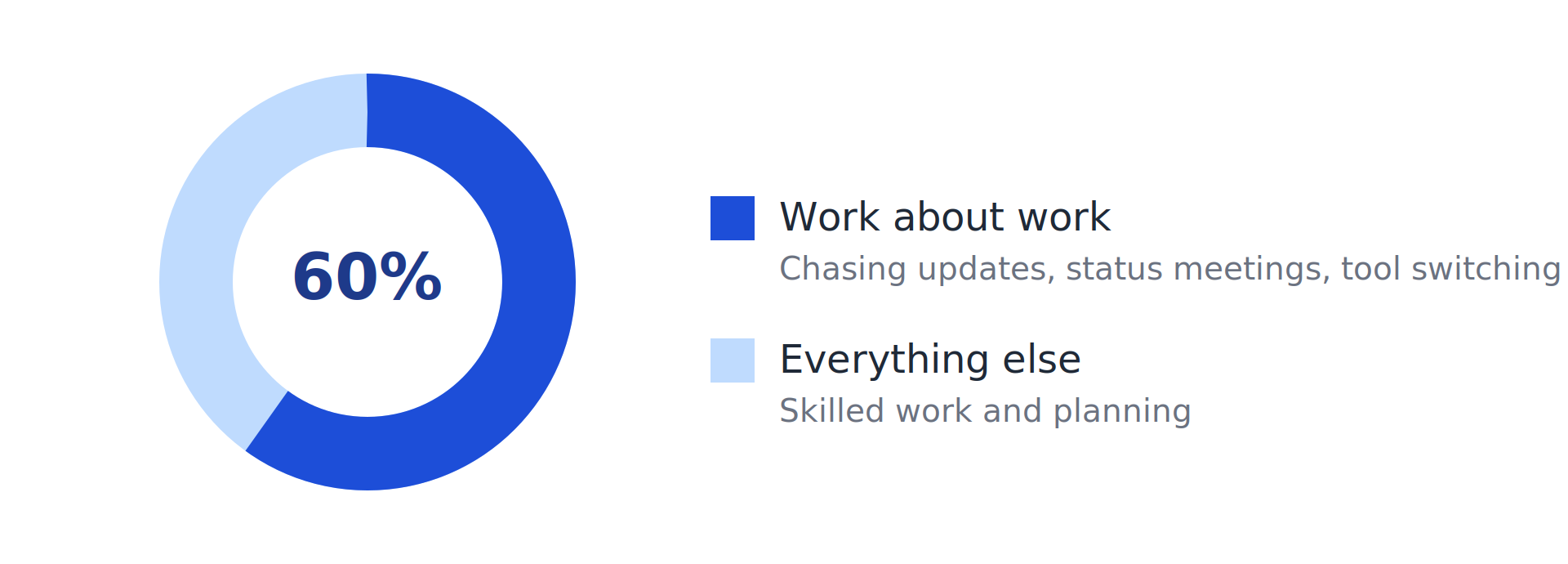
Start with the cost of not knowing. Asana’s Anatomy of Work research found that knowledge workers spend about 60% of their time on “work about work”: chasing updates, sitting in status meetings, and switching between tools. The 2023 edition put the figure at 58%, and workers estimated that better processes could save them 4.9 hours a week.
The same Asana research found that 88% of knowledge workers agreed time-sensitive projects had slipped through the cracks because of the volume of tasks on their plate. Nobody lacks effort in that picture. They lack a shared, current view of what matters and who owns it.
Then there’s the manager effect. Gallup estimates that managers account for at least 70% of the variance in engagement scores across business units. That’s variance between teams, not a claim that managers control 70% of how anyone feels. Still, it points at something practical: clear ownership and expectations are among the few levers a manager can change this week.
How to track employee tasks: 9 methods compared
No method wins everywhere. The right one depends on team size, where people sit, and whether the work repeats. The Time Doctor guide, ActivTrak’s methods overview, and Workyard’s beginner’s guide cover similar ground; the table below merges them and adds the failure point of each.
| Method | Works best for | Breaks down when |
|---|---|---|
| To-do lists | One person, one-off tasks | Anyone else needs to see or edit them |
| Whiteboards | Small in-office teams | The team splits across locations, or tasks repeat |
| Spreadsheets | Small teams with simple tasks | Updates lag and columns multiply |
| Calendars | Deadline-driven, recurring duties | You need real progress, not planned time |
| Kanban boards | Multi-step workflows, spotting bottlenecks | Nobody reviews the board, or work needs sign-off |
| Task management software | Growing teams, repeating work | Status still relies on people remembering to update it |
| Time-tracking software | Billable work, payroll | You need to know what finished, not only how long it took |
| GPS tracking | Field crews on job sites | The work happens at a desk |
| Ticketing systems | Support and IT queues | Work isn’t request-driven |
Where spreadsheets stop working
Spreadsheets deserve a longer look because most teams start there and stay too long. For example, a sheet with columns for assignee, due date, status, and priority costs nothing and takes ten minutes to set up. That’s the appeal.
However, the trouble starts once more than a few people edit it. Someone renames a column. Two people change the same row. A task says “In progress” long after it was finished. As a result, nothing sends a reminder, and nothing records that a status changed or who changed it. ActivTrak makes a version of this point about all manual tools: they only show what people remember to update.
So, Kanban boards are the natural next step. Cards move across To Do, In Progress, and Done, so bottlenecks become visible at a glance. For a team of five to ten people, that’s often enough for a long time.
Employee task management software: what to look for
At some point the manual methods stop scaling and you start shopping for employee task tracking software. Six features separate tools worth paying for from glorified lists:
- Assignment with owners, due dates, and priorities. One named owner per task, always.
- A status history. Who changed what, and when.
- A workload view. You should see who’s overloaded before a deadline slips, not after.
- Reminders and automation. Deadline alerts and recurring tasks that don’t depend on you.
- Reporting. Completion and overdue counts you can review weekly.
- Integrations. Payroll, CRM, and chat, so nobody enters the same data twice.
Comparing tool pricing
Here’s how five well-known tools and Techxaro One stack up. Prices are the starting per-user figures Time Doctor listed in its February 2026 guide, so check each vendor’s pricing page before you decide.
| Tool | Best for | Notable features | Starting price |
|---|---|---|---|
| Techxaro One (ours) | Agencies and growing teams | Assign, submit, review, approve; tracked time; status timeline; roles | Free trial + $5/user/month |
| Trello | Small teams, visual workflows | Kanban boards, templates, automation rules | Free plan; paid from $5/user/month |
| Time Doctor | Remote and outsourced teams | Time and activity tracking, timesheets, payroll integrations | From $6.70/user/month |
| Jira | Software and agile teams | Scrum and Kanban boards, timelines, automated workflows | Free up to 10 users; paid from $7.53/user/month |
| Toggl Track | Small teams needing time data | Task-level time tracking, timesheets, 100+ integrations | Free up to 5 users; paid from $9/user/month |
| Microsoft Project | Microsoft-centric organizations | Grid, board, and timeline views, roadmaps, Teams integration | From $10/user/month |
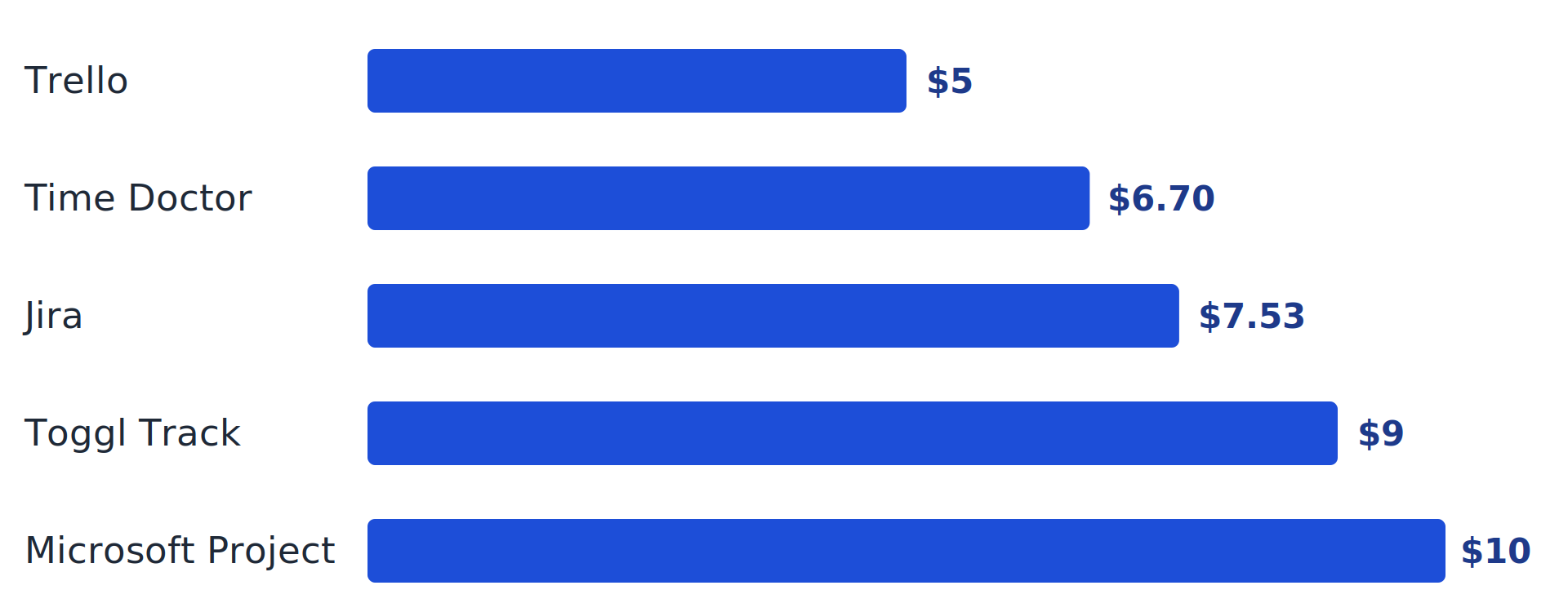
My read: if all you need is a board, Trello’s free tier is hard to beat. If you need hours for payroll or billing, pick a time tracker. If work has to be reviewed before it counts as finished, you want approvals built in, and most boards leave that to a comment thread.
Where task trackers go wrong: status is a guess
Here’s the quiet flaw in almost every tracker. The status is whatever the last person typed.
Picture a designer who drags a card to “Done” at 5 p.m. on Friday. The manager sees green. Meanwhile, on Monday the client says the file is the wrong size. Did anyone actually finish the task? The board says yes. The client says no. Nobody can say when the file changed, or whether anyone looked at it before it was marked complete.
Any team that manages employee tasks at scale hits this. A board records what people report, and reports drift from reality. Time and activity monitors try to fix it by watching people, which raises a different problem (more on that below). There’s a third option: make “done” something a second person confirms.
That’s how Techxaro One handles it. Someone assigns a task, the assignee submits the work, and a reviewer either approves it or reopens it with a stated reason. As a result, the whole sequence sits in a timeline that dates and owns every status change. Submissions are versioned, so you can see what changed between the first attempt and the third. Time is tracked on the task itself, and roles such as Team Lead decide what each person sees and can act on. The product tour walks through each step.
As a result, the payoff is a different kind of accountability. You don’t watch anyone’s screen. You just make it impossible for a task to be finished without evidence, and impossible to reopen without a reason. Rework counts become a number you can read instead of an argument you have.
Employee productivity tracking without the surveillance
Employee productivity tracking is where good intentions go sideways. ActivTrak’s own guide warns that going too far invites micromanagement, and going too little leaves you without the insight to change anything. The surveys show where “too far” begins.
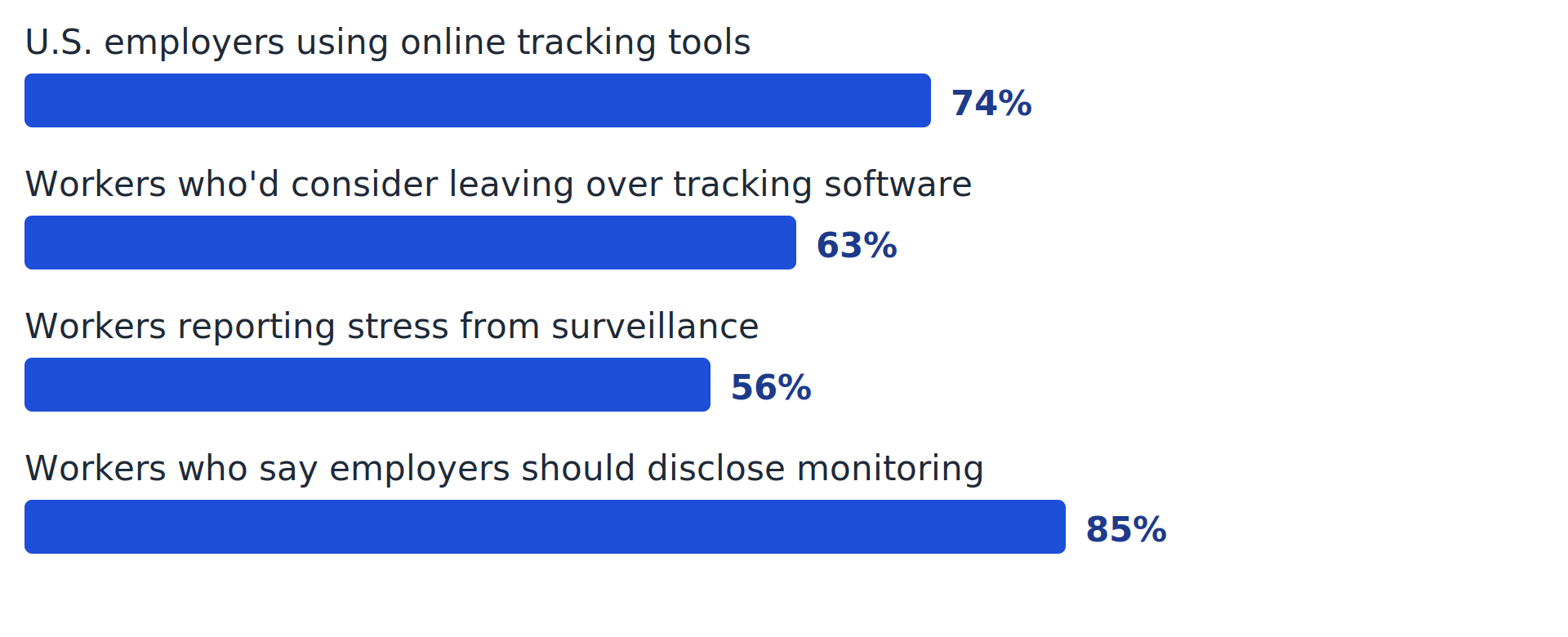
Read that chart twice. In other words, most employers already track. Most workers want employers to disclose it. And a majority of one surveyed group would treat tracking software as a reason to look elsewhere. Raconteur reported that 28% strongly agreed. Those are the people you least want to lose.
My position: track ownership, status, deadlines, and rework. Skip keystrokes and screenshots unless a regulator or client contract requires them. Tell the team, in writing, what’s tracked and why. Time Doctor’s advice to tell employees exactly what you intend to track matches what the disclosure numbers suggest.
| Track this | Skip this (for most teams) |
|---|---|
| Task status and owner | Keystroke logging |
| Due dates and on-time completion | Constant screenshots |
| Time on billable or budgeted tasks | Webcam monitoring |
| Rework and reopen counts | Idle time scored as performance |
| Workload per person | Anything you wouldn’t tell the team about |
How to set up employee task tracking in 5 steps
Here’s the short version, then the detail. Decide the problem, pick the lightest tool, define “done,” tell the team, and review weekly.
- Name the problem you’re solving. Late deliveries, unclear ownership, and inaccurate billing need different fixes. What goes wrong: teams buy software first and discover later that they wanted better handoffs.
- Pick the lightest method that works. Use the methods table above. For example, a five-person team rarely needs more than a Kanban board. What goes wrong: over-buying, then watching half the features go unused.
- Define what “done” means. Write acceptance criteria into the task, or require a submission and a review. What goes wrong: “done” means “I stopped working on it.”
- Tell the team what’s tracked and why. Put it in writing, and add what you won’t track. What goes wrong: people find out on their own, and the trust hit outweighs any data you collect.
- Review weekly and adjust. Ten minutes: what’s overdue, what’s blocked, who’s overloaded. Ask the team what’s annoying about the system and change one thing. What goes wrong: nobody looks at the data, so people stop updating it.
Team task management: a weekly rhythm
Team task management works better as a habit than as a tool. A simple weekly cadence keeps task management for teams from decaying into a graveyard of stale cards:
- Monday: confirm priorities and make sure every task has one owner and a due date.
- Midweek: clear blockers. Look at the workload view and move work off anyone stretched thin.
- Friday: review what was submitted, approve or reopen it, and note anything that keeps coming back.
- Monthly: look at overdue rates and rework counts, and decide what to change in how tasks are written or assigned.
The workload check matters more than it looks. When you can see who has too much, you can rebalance before someone burns out, which is the same point ActivTrak makes about hidden backlogs. Additionally, Techxaro One’s resource and capacity view is built for exactly this kind of midweek check.
Frequently asked questions
Q. What is the best way to track employee tasks?
Ans: It depends on team size and how work gets finished. Small teams with simple tasks can use a spreadsheet or a Kanban board. Growing teams do better with task management software that keeps a status history and sends reminders.
Q. What’s the difference between task tracking and time tracking?
Ans: Task tracking records who owns a piece of work, its status, and its due date. Time tracking records how many hours went into it. One tells you whether it’s finished; the other tells you what it cost. Many tools combine both.
Q. How do I track employee work without micromanaging?
Ans: Track outcomes and ownership instead of activity. Tell the team what’s tracked, skip screenshots and keystroke logging, and use the data in weekly conversations about blockers and workload rather than in surprise reviews.
Q. What is the best free employee task tracking tool?
Ans: Trello, Asana, and Toggl Track all offer free plans that suit small teams. Free tiers limit features like automation and integrations, so expect to upgrade as the team grows. Techxaro One offers a 30-day free trial with no credit card.
Q. Can employee task tracking help with compliance?
Ans: Yes. A dated record of who did what supports audits and client requirements. It matters most in regulated fields such as healthcare and finance, where Time Doctor notes that documented hours and tasks help demonstrate compliance with labor rules and internal policies.
Try employee work tracking on real projects
Set up a workspace in under five minutes, assign a real task, and see what a reviewed, timestamped “done” looks like. Techxaro One includes a 30-day free trial and needs no credit card.
