
Standardize SEO & Web Dev Workflow Automation
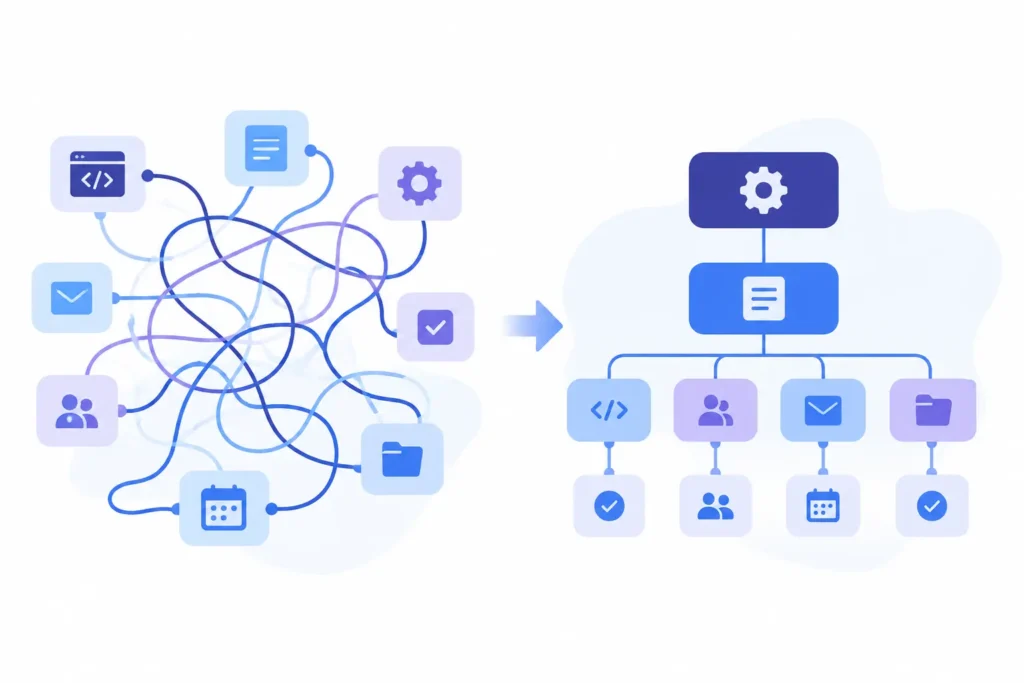
You can standardize SEO and web development workflows with workflow automation by turning the recurring, repeatable parts of the work- site audits, on-page changes, content publishing, deployments, client reporting- into defined steps with clear triggers, owners, and hand-offs, so the process runs the same way every time regardless of who’s doing it. Workflow automation isn’t about replacing the judgment calls SEO and dev work genuinely need; it’s about removing the parts that don’t need judgment at all, so expertise gets spent on strategy instead of remembering which step comes next.
I’ve run this kind of work long enough to know the failure pattern by heart: every specialist develops their own private checklist, stored in their head or a personal notes doc, and it works fine until that person goes on leave, hands a client off, or the team outgrows what tribal knowledge can hold together. Then the cracks show: a missed audit step, a deployment that skips a pre-launch check someone used to remember, a client asking “didn’t we already fix this?” about something fixed three different ways by three different people. Standardizing the workflow is what turns “how Sarah does it” into “how we do it,” regardless of who’s on the account that week.
Why SEO and Web Development Workflows Resist Standardization

SEO and web development work sits in an awkward middle ground, repeatable enough to deserve a process, but variable enough that a rigid, one-size-fits-all checklist tends to break the moment it meets a real client site. I’ve watched teams fail in two predictable ways here: total ad-hoc freedom, where every specialist runs their own process with nothing written down to hand off, and over-rigid standardization, a single fixed checklist applied identically to every client regardless of site size, CMS, or industry, which looks organized on paper but quietly fails once a workflow built for a 20-page brochure site meets a 2,000-page ecommerce catalog.
Here’s where the two failure modes tend to show up most often across a typical agency’s SEO and dev work:
The SEO and Web Development Workflows Worth Standardizing First
Not every task benefits equally from standardization. Start with work that’s frequent, repeatable, and currently inconsistent, since that’s where standardization pays off fastest. Here’s how I’d prioritize it.

| 1 | Site audits. This is usually the highest-value workflow to standardize first, because it’s run repeatedly across every client and directly shapes what work gets prioritized afterward. A standardized audit workflow defines exactly what gets checked (technical SEO, on-page elements, site speed, mobile usability, broken links), in what order, and who reviews the findings before they reach the client. Without this, two specialists auditing the same site can walk away with completely different priority lists. |
| 2 | On-page optimization requests. Meta tag updates, internal linking, and content optimization tend to arrive as a steady trickle of small requests rather than one big project. Standardizing this means every request follows the same intake, review, and sign-off steps regardless of who submits it or who picks it up, so nothing gets implemented inconsistently or skipped because it seemed minor. |
| 3 | Content publishing workflows. From draft to SEO review to CMS upload to final QA, publishing content usually involves several hand-offs between writers, SEO specialists, and developers. Standardizing this workflow means defining exactly what “ready to publish” looks like at each stage, so content doesn’t go live missing alt text, internal links, or proper schema because a step got silently skipped under deadline pressure. |
| 4 | Deployment and release workflows. Pushing code or site changes live is one of the highest-risk workflows to leave informal, because a missed pre-launch check can take a client site down or break tracking silently. A standardized deployment workflow defines the exact pre-launch checklist, who signs off, and what the rollback plan is, applied the same way whether it’s a minor hotfix or a full site release. |
| 5 | Client reporting cycles. Reporting is repetitive by nature, monthly or quarterly, tied to the same metrics, for the same client relationship. Standardizing this means the same report structure, the same data sources, and the same review step happen every cycle, rather than each account manager building their own report format from scratch every time. |
Here’s a quick reference for how these workflows typically rank by both frequency and current inconsistency, which is a useful way to prioritize where to standardize first:
Getting these five workflows standardized covers the overwhelming majority of the repeatable work in most SEO and web development teams. The rest tends to be genuinely one-off strategy work, which shouldn’t be standardized in the first place, since forcing a checklist onto strategic thinking is exactly the over-rigid failure mode covered earlier. What matters is that these standardized workflows actually live inside the same workspace where the work itself happens, not in a separate document nobody opens once the project starts moving.
How to Actually Build and Implement a Standardized Workflow
Knowing which workflows to standardize is only half the job. Actually building one that a team will use, rather than quietly work around, requires a specific approach. Here’s what I’ve found works.
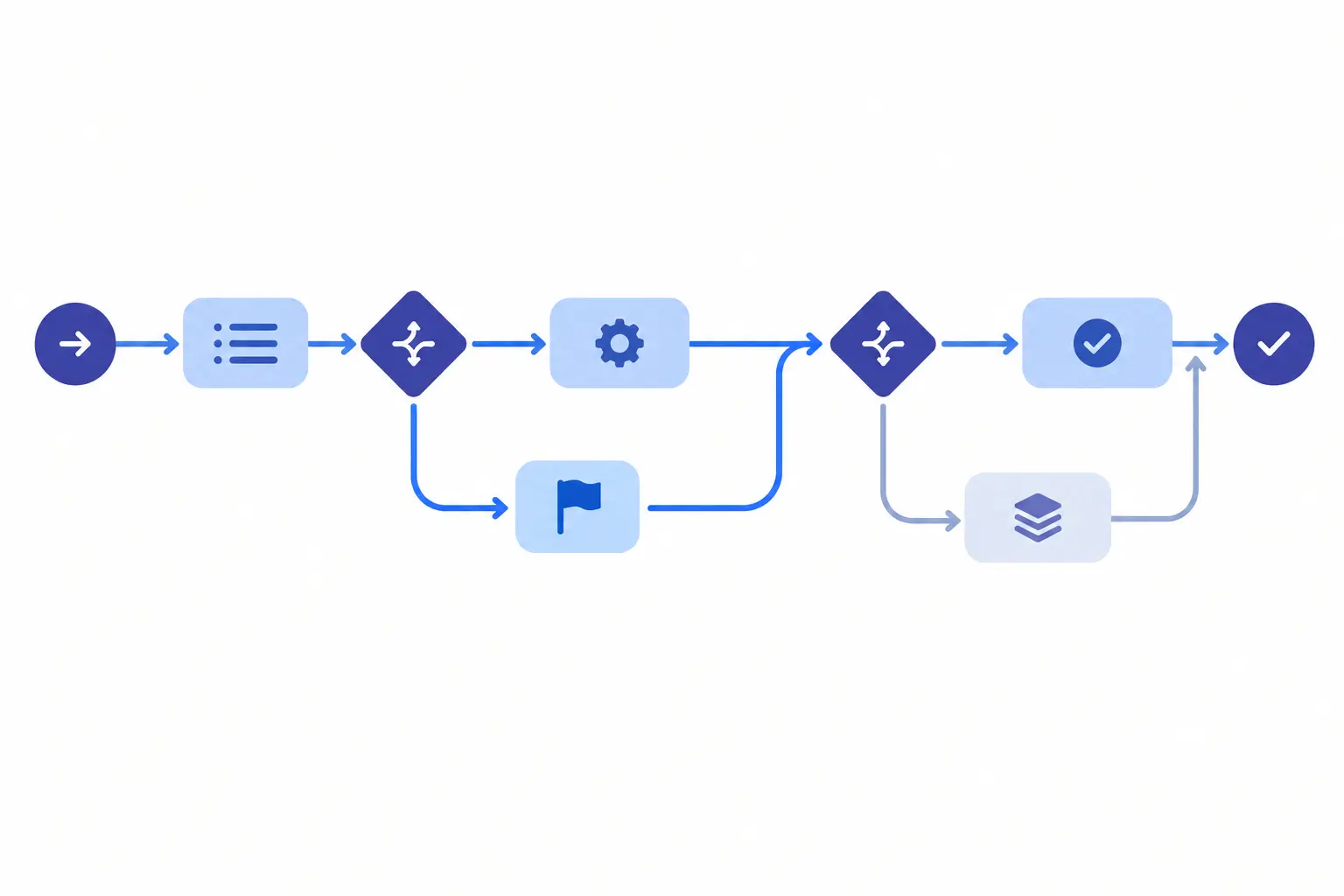
| 1 | Document the workflow as it’s actually being done today, not how it’s supposed to be done. Before designing anything new, sit with the people currently doing the work and trace exactly what they do, in what order, including the steps they don’t think to mention because they’ve become automatic. This reveals the real variance across specialists, which is usually wider than anyone expects. |
| 2 | Identify the branch points, not just the steps. A standardized workflow isn’t one straight line. It’s a main sequence with clearly defined decision points; this step differs if the site is on WordPress versus headless; this report format differs if the client is ecommerce versus B2B lead-gen. Naming these branches explicitly is what keeps a standardized workflow from becoming the over-rigid checklist that gets abandoned under real conditions. |
| 3 | Define what “done” looks like at every stage, not just at the end. Ambiguity about whether a step is actually complete is one of the most common places standardization quietly breaks down. A content publishing workflow needs a clear definition of “SEO review complete,” not just “content published,” so nothing slips through because someone assumed a previous step had already covered it. |
| 4 | Assign explicit ownership for each step. A standardized workflow with no named owner at each stage defaults back to whoever happens to notice the work needs doing, which is exactly the informal pattern standardization is meant to replace. Every step needs one person or role responsible for it, even if multiple people could technically do it. |
| 5 | Build the workflow into the actual tool the team works in daily. A standardized process documented in a separate wiki or slide deck will drift out of use within weeks, because the team’s daily habits live inside their project management tool, not a reference document they have to remember to check. Workflow automation is what turns a written process into something that actually triggers itself, assigning the next step, flagging a missed deadline, or routing an approval, without anyone needing to remember it should happen. |
| 6 | Pilot on one client or one project before rolling out broadly. Test the standardized workflow on a real, active account first. This surfaces gaps in the branch points or ownership assignments while the stakes are still low, rather than after the workflow has already been rolled out across every client relationship. |
| 7 | Revisit the workflow on a set cadence. A standardized workflow isn’t something you build once and leave alone. Client needs shift, CMS platforms change, and new tools get added to the stack. Reviewing the workflow quarterly, or whenever a recurring exception starts appearing often enough to need its own branch, keeps it matching how the work actually happens rather than how it happened when it was first documented. |
Common Mistakes When Standardizing SEO and Web Development Workflows
Even with good intentions, standardization efforts tend to fail in a handful of predictable ways. Here’s what I’ve seen go wrong most often, and the early signal that usually gives it away.
| 1 | Standardizing before understanding why the current process is inconsistent. It’s tempting to jump straight to building a new workflow without first understanding why specialists are doing things differently in the first place. Sometimes the variation exists for a good reason: a specific client requires an extra step the standard process doesn’t account for, and forcing everyone into one process erases that necessary flexibility rather than capturing it as a proper branch. Early warning sign: Specialists start quietly working around the new standardized workflow within the first few weeks, which usually means it didn’t account for a real, legitimate exception. |
| 2 | Treating the workflow as documentation instead of an active system. A standardized process written up in a shared doc or wiki looks complete but changes nothing on its own. It only becomes real once it’s built into the actual tool where work happens, triggering the next step automatically rather than relying on someone to remember to check the document. Early warning sign: People can describe the standardized process accurately in a meeting but don’t actually follow it day to day. |
| 3 | Over-standardizing creative or strategic work. Not everything benefits from a fixed workflow. Forcing a rigid checklist onto genuinely one-off strategic decisions, like determining a client’s overall SEO priority given their specific competitive landscape, slows down the judgment calls that shouldn’t be automated in the first place. Early warning sign: Senior specialists start complaining that the process feels like busywork rather than support, which usually means it’s been applied somewhere it doesn’t belong. |
| 4 | No clear ownership at each stage. A workflow that says a step needs to happen without naming who’s responsible for it defaults back to informal habits; whoever happens to notice picks it up, which recreates the exact inconsistency standardization was meant to fix. Early warning sign: The same step gets missed repeatedly, but no single person feels accountable for catching it. |
| 5 | Rolling out to every client at once instead of piloting first. Standardizing a workflow and immediately applying it across the entire client roster means every gap in the design gets discovered at scale, under real deadline pressure, rather than safely on one account first. Early warning sign: Multiple clients hit the same workflow problem in the same week, which usually means a pilot phase was skipped. |
FAQs
What does it mean to standardize a workflow?
Standardizing a workflow means defining a consistent sequence of steps, ownership, and decision points for a repeatable process, so it runs the same way regardless of who’s doing the work. It doesn’t mean removing flexibility entirely; a well-standardized workflow includes clear branch points for legitimate variations, like different site sizes or CMS platforms, rather than forcing every case through an identical rigid path.
Why is SEO and web development work harder to standardize than other tasks?
SEO and web development work sits between fully repeatable and fully custom. Tasks like site audits, on-page optimization, and deployments happen often enough to deserve a defined process, but vary enough by site size, CMS, and client needs that a single rigid checklist tends to break down in practice. The right approach uses conditional branching rather than one fixed sequence.
Which workflows should a team standardize first?
Start with the most frequent and currently inconsistent workflows, typically site audits, on-page optimization requests, content publishing, deployments, and client reporting. These cover the majority of repeatable work in most SEO and web development teams, while genuinely strategic, one-off decisions are better left flexible rather than forced into a checklist.
How is workflow automation different from just writing a documented process?
A documented process describes what should happen but relies on people remembering to follow it. Workflow automation builds those same steps directly into the tool where the work happens, so the next step gets assigned, a deadline gets flagged, or an approval gets routed automatically, without depending on someone checking a separate reference document.
How do you keep a standardized workflow from becoming too rigid?
Build explicit decision points into the workflow rather than a single fixed sequence, so it adapts based on site size, CMS platform, or client tier without needing to be entirely rebuilt for each exception. Piloting the workflow on one account before rolling it out broadly also helps catch places where it’s too rigid before it affects every client relationship.
Final Thoughts
Every SEO and web development team I’ve seen struggle with inconsistency wasn’t short on talented specialists. They had plenty of skill, just no shared structure connecting how that skill got applied from one account to the next. The gap wasn’t expertise. It was that every specialist’s process lived in their own head, undocumented and unautomated, which meant it disappeared the moment that person was out sick, moved to a different account, or left the company entirely.
Let the repeatable work run itself
I’d rather spend a week properly mapping out how our site audits, deployments, and reporting cycles actually get done today than spend another quarter watching the same inconsistencies repeat themselves across different client accounts. That’s the real case for workflow automation in SEO and web development work: not less flexibility, but a structure where the repeatable parts of the work run themselves, freeing the team’s actual expertise for the parts that genuinely need it, which is exactly what Techxaro One is built to support.
